Telenor Balance Share Code 2026 – Easy Balance Transfer Guide in Pakistan
The Telenor balance share code allows eligible Telenor prepaid users to send mobile credit to another Telenor number. You can use this service when a friend or family member runs out of balance. Below, you will find the transfer method, charges, limits, and solutions to common problems.
What is the Telenor balance share service?
Telenor Smart Share lets prepaid customers transfer some of their available balance to another Telenor number. It is useful when someone needs mobile credit for calls, SMS, or other services but cannot recharge immediately.
Before using the service, check your available balance and make sure the receiver’s number is correct. The transfer may include a service fee, so keep enough credit to cover both the amount you want to send and the applicable charges.
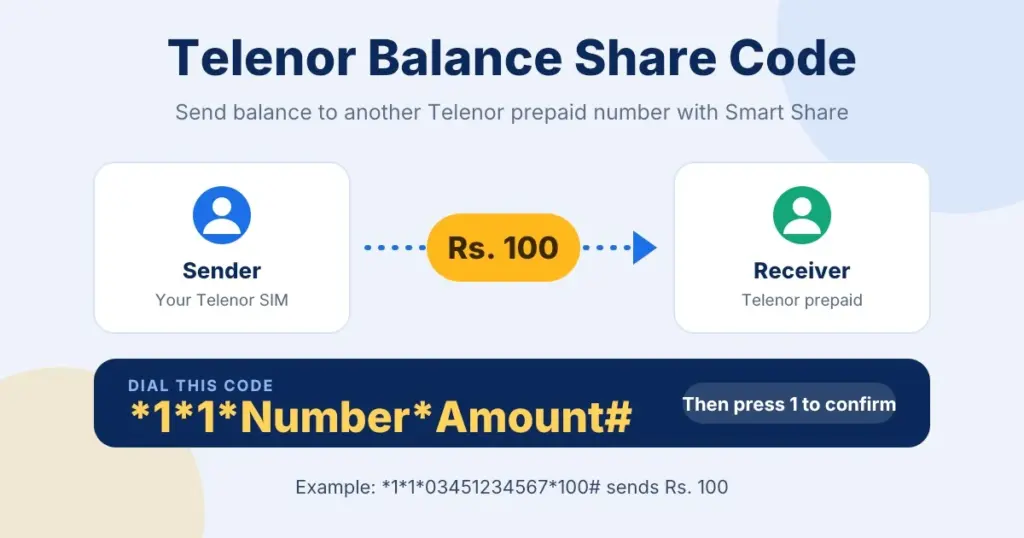
Telenor balance share code and format
The Telenor Smart Share code is:
*1*1*923XXXXXXXXX*Amount#
Replace the number and amount with the receiver’s details.
You must enter the receiver’s number in international format. Remove the first zero and add 92 before the remaining digits.
Balance transfer code with example
For example, if you want to send Rs. 100 to 0345 1234567, dial:
*1*1*923451234567*100#
Press the call button and follow the confirmation prompt. Check the number and amount before approving the transfer.
How to share Telenor balance step by step
Follow these steps to transfer credit:
- Open the phone dialer on your Telenor SIM.
- Enter the Smart Share code with the receiver’s number.
- Add the amount you want to transfer.
- Press the call button.
- Read the confirmation details and approve the transaction.
Confirming the balance transfer
After entering the code, you may receive a confirmation prompt. Press 1 to approve the transfer if the number and amount are correct. Wait for the confirmation SMS before assuming the balance has been sent.
Telenor balance share charges and limits
Telenor deducts a service fee from the sender’s balance for each successful Smart Share transaction. Keep enough credit to cover the transfer amount and the fee.
Transfer fee in PKR
The reported Smart Share fee is Rs. 7 per transaction, including tax. For example, if you send Rs. 100, your balance may be reduced by Rs. 107 in total. Check the confirmation screen for the current Telenor balance share charges before approving the transfer.
Minimum and maximum transfer limits
The reported transfer limits are:
- Minimum amount: Rs. 20
- Maximum amount: Rs. 200
- Daily limit: Up to 10 transfers
These limits may change, so check the current confirmation message or contact Telenor before making a transfer.
Why is the Telenor balance share code not working?
If your Telenor balance check code is not working, check your number format, available balance, and network connection. An incorrect receiver number or insufficient credit can cause the transaction to fail.
Common problems and their solutions
| Problem | Possible solution |
| Incorrect number format | Use 92 instead of the first 0 |
| Insufficient balance | Keep extra credit for the service fee |
| Wrong transfer amount | Stay within the allowed transfer limits |
| Network issue | Try again after the signal improves |
| Service unavailable | Contact Telenor helpline at 345 |
If the problem continues, contact customer support and ask whether Smart Share is available on your SIM.
Can you share balance with other networks?
No, Telenor Smart Share is intended for transfers between eligible Telenor prepaid numbers. You cannot use the Telenor balance share code to other network numbers, such as Jazz, Zong, or Ufone.
Alternatives for sending balance to other networks
If you want to send credit to a Ufone number, use an available Ufone recharge or UShare service instead. The Telenor balance share code to Ufone will not work through Smart Share.
Similarly, the Telenor balance share to Easypaisa account code is not a supported Smart Share option. Mobile balance and Easypaisa wallet funds are different. To send money to an Easypaisa account, use the Easypaisa app or another supported money transfer method.
Important tips before sharing balance
Always check the receiver’s network, phone number, and requested amount before confirming a transfer. Also, keep enough balance to cover the service fee.
How to avoid sending balance to the wrong number
Follow these simple tips:
- Check all digits of the receiver’s number.
- Use the correct international number format.
- Confirm the transfer amount before pressing 1.
- Do not share your SIM PIN or personal security details.
- Keep the confirmation SMS until the transaction is complete.
Can you reverse a wrong balance transfer?
A completed balance transfer may not be reversible. If you send credit to the wrong number, contact Telenor customer support at 345 as soon as possible. Share the transaction details and ask whether any recovery option is available. Recovery is not guaranteed.
Frequently asked questions
What is the Telenor balance share code?
Dial *1*1*923XXXXXXXXX*Amount# from your Telenor prepaid SIM. Replace the number and amount with the receiver’s details, then press 1 to confirm.
How many times can I share balance in a day?
The reported daily limit is up to 10 transfers. Check the current service conditions before making multiple transactions.
Can postpaid users share balance?
Smart Share is intended for prepaid customers. Postpaid users should contact Telenor support at 345 to ask about available balance transfer options.
Does shared balance extend SIM validity?
No. Receiving shared balance does not extend your SIM’s validity period. Your SIM validity and balance validity are separate conditions.
For more mobile network guides, package updates, and daily quiz information, visit Telenor Today Answers on our homepage.